
Documentation
iPhone notifications for shell scripts, cron and backups
Send encrypted build and backup alerts with Ntfyx. Keep the original exit code, handle notification failures, and run the same script from cron.
Updated
Before you start
#Install the current Ntfyx CLI (0.1.2) on macOS or Linux and use a compatible Ntfyx iPhone build (iOS 18.4 or later). The iPhone app is awaiting App Store review; installing the CLI alone does not give you a connected phone. Free includes one active Topic. Several sources can use that Topic; adding a source does not require another paid Topic.
- Display the fresh pairing QR on your computer. Keep the QR private.
- In the iPhone app, open Connect Topic, scan the QR, and create or choose a named Topic. Authorize this computer.
- Use Work as the local CLI alias in these examples, or replace Work with your configured alias.
curl -fsSL https://ntfyx.me/install.sh | bash
export PATH="$HOME/.local/bin:$PATH"
ntfyx version --json
ntfyx connect
ntfyx topicsSend your first alert
#Once paired, send a plain notification to the Work connection. The CLI encrypts it for your authorized receivers. A successful send means the service accepted the message; the phone still needs notification permissions and a working delivery path.
ntfyx send "Build finished. Ready to review." --title "Build complete" --topic WorkNotify when a command exits
#Download the short wrapper and inspect it before running. It runs the command exactly as passed, then sends a generic exit-status notification. It does not forward the command arguments or terminal output.
curl -fsSLo notify-after.sh https://ntfyx.me/examples/scripts/notify-after.sh
cat notify-after.sh
bash notify-after.sh Work bash -c 'printf "Example job finished\n"'Keep the result in your terminal
#A successful command exits 0. A failed command keeps its own exit status, even when the notification cannot be sent. The wrapper writes a warning if notification acceptance is not confirmed. Avoid putting credentials or sensitive logs into notification text.
bash notify-after.sh Work bash -c 'exit 7'
printf "Original command exit: %s\n" "$?"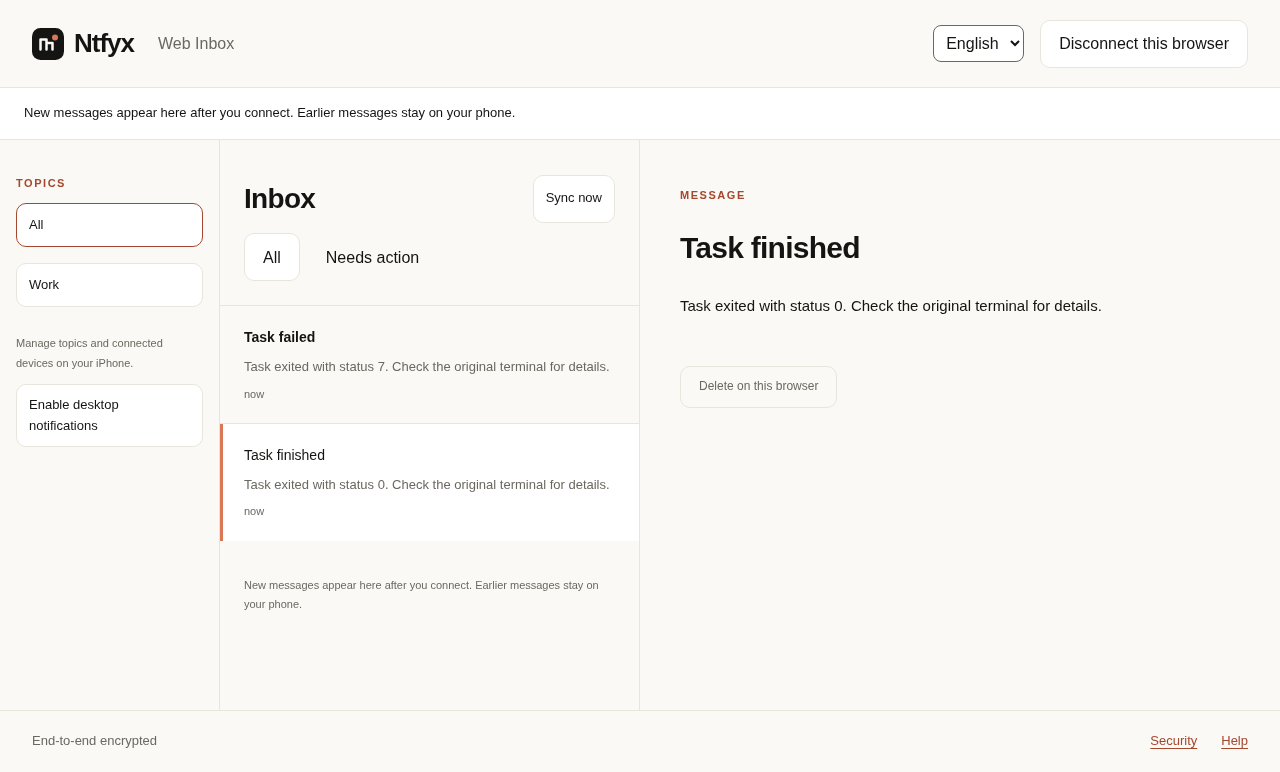
Builds and backups
#Pass your existing command as separate arguments. The wrapper runs it once and reports its exit status. The backup example below creates an archive containing only the downloaded wrapper, in a temporary directory. Inspect the command before running it; a successful archive is not proof that a backup can be restored.
bash notify-after.sh Work npm run build

# Harmless backup sample: archive only this downloaded script.
ntfyx_demo_dir="$(mktemp -d)"
bash notify-after.sh Work tar -czf "$ntfyx_demo_dir/sample.tar.gz" notify-after.sh
ntfyx_backup_status=$?
printf "Backup exit status: %s\n" "$ntfyx_backup_status"
# If the backup succeeded, inspect the archive separately.
if [ "$ntfyx_backup_status" -eq 0 ]; then
  tar -tzf "$ntfyx_demo_dir/sample.tar.gz"
fiSchedule with cron on Linux
#Install and pair as the same user that runs the job. Cron has a smaller environment than an interactive terminal: set PATH, use absolute paths, and keep job output in a local log. Run the exact command manually first. This sample sends a harmless completion alert at 09:00 in the scheduler’s timezone; replace YOUR_USER and the script path before adding it with crontab -e.
On macOS, use your existing launchd scheduler instead.
# Example user crontab; replace YOUR_USER before use.
PATH=/home/YOUR_USER/.local/bin:/usr/bin:/bin
0 9 * * * /bin/bash /home/YOUR_USER/notify-after.sh Work /bin/true >> /home/YOUR_USER/ntfyx-job.log 2>&1
Diagnose a missing or failed notification
#Test a failed job with exit 7 before relying on the wrapper. If the job fails and sending also fails, the wrapper still exits 7 and writes a notification warning. Check the local log, ntfyx doctor, the configured Topic, and phone notification permission, Focus and quiet hours. Acceptance by the relay does not prove the phone displayed an alert.
| Job result | Notification result | Wrapper exit |
|---|---|---|
| Success (0) | Accepted | 0 |
| Failure (7) | Accepted | 7 |
| Failure (7) | Not confirmed | 7, with a warning |
| Success (0) | Not confirmed | 0, with a warning |
What was verified
#These scripts were tested with the compiled CLI, a real local encrypted relay and signed replies from the Web Inbox. Phone authorization in that automated test used a programmatic identity. The screenshots show synthetic messages from that local Web test; they are not iPhone or APNs delivery evidence.