
Documentation
Wait for a phone decision before continuing.
Try a harmless Ntfyx approval gate. Continue only after a verified Allow and a successful one-time claim; stop on Deny, timeout, connection failure or an already claimed answer.
Before you start
#Install the current Ntfyx CLI (0.1.2) on macOS or Linux and use a compatible Ntfyx iPhone build (iOS 18.4 or later). The iPhone app is awaiting App Store review; installing the CLI alone does not give you a connected phone. Free includes one active Topic. Several sources can use that Topic; adding a source does not require another paid Topic.
- Display the fresh pairing QR on your computer. Keep the QR private.
- In the iPhone app, open Connect Topic, scan the QR, and create or choose a named Topic. Authorize this computer.
- Use Work as the local CLI alias in these examples, or replace Work with your configured alias.
curl -fsSL https://ntfyx.me/install.sh | bash
export PATH="$HOME/.local/bin:$PATH"
ntfyx version --json
ntfyx connect
ntfyx topicsInspect and run the demo
#This example asks a question, waits synchronously and prints a harmless demo message only when the CLI returns success. It does not deploy software, run a payment or execute an external operation.
curl -fsSLo approval-demo.sh https://ntfyx.me/examples/scripts/approval-demo.sh
cat approval-demo.sh
bash approval-demo.sh WorkAnswer on your phone
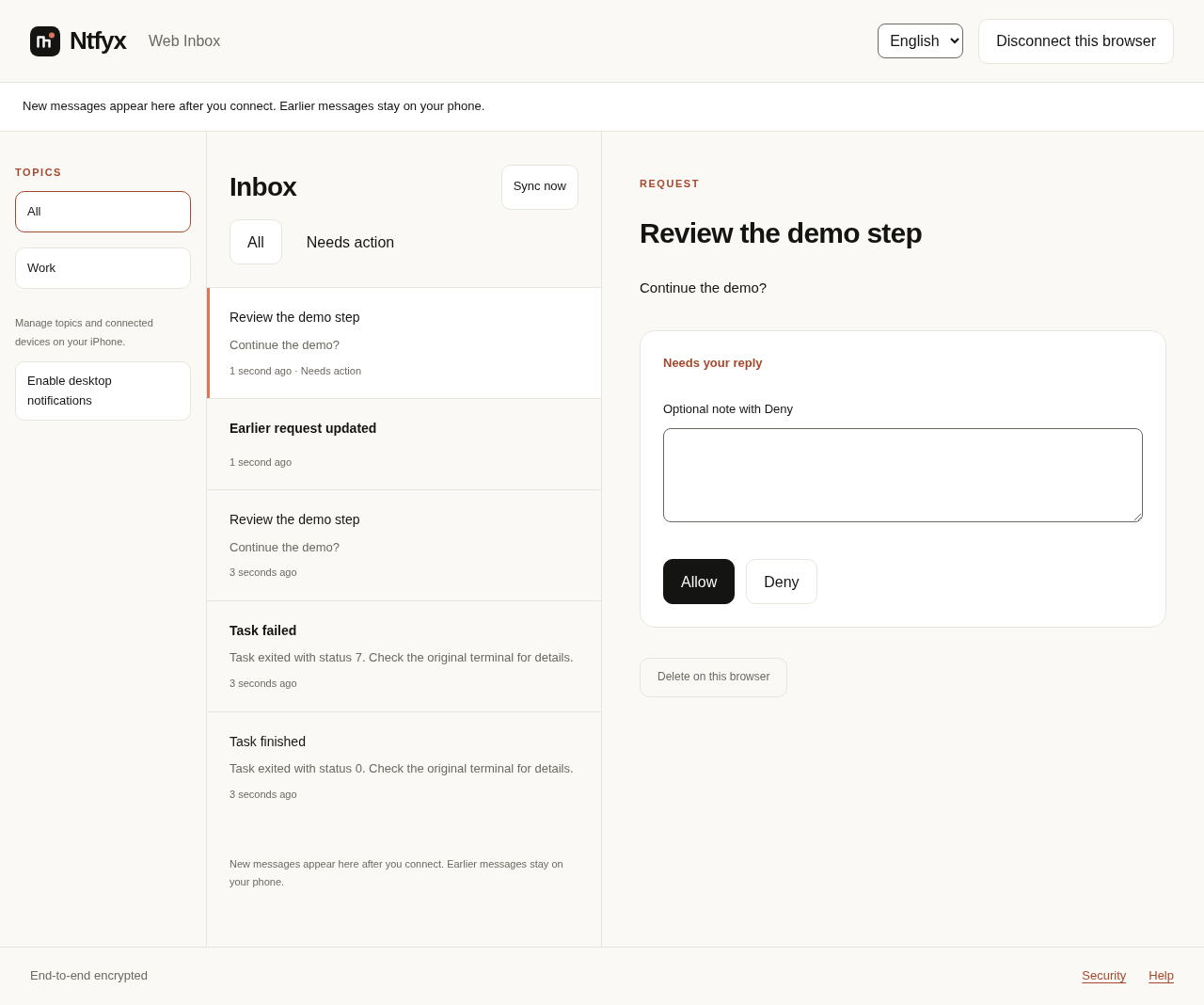
#Open the request titled Review the demo step. Check the question and choose Allow or Deny. You can also answer a new request in a browser that your phone authorized. The receiver signs and encrypts the answer for the original source.
Understand the exit status
#The script waits up to 60 seconds by default and the request expires after 90 seconds. A pending request can remain answerable after the local wait ends. A late reply never restarts an exited script.
| Outcome | CLI exit | Demo continues? |
|---|---|---|
| Verified Allow and claim acquired | 0 | Yes, prints one demo line. |
| Deny | 10 | No. |
| Local wait timed out | 14 | No. |
| Answer already claimed | 15 | No. |
| Transport failure | Nonzero | No. |
bash approval-demo.sh Work 1sConnect a real operation carefully
#The synchronous CLI verifies the reply and acquires its one-time claim before returning success. Only the successful branch may continue. Keep your external operation idempotent and record its outcome separately: a claim cannot make an external deployment or transaction exactly once. If the result of a claim or operation is unknown, investigate instead of automatically rerunning the operation or requesting a fresh approval.
What was verified
#These scripts were tested with the compiled CLI, a real local encrypted relay and signed replies from the Web Inbox. Phone authorization in that automated test used a programmatic identity. The screenshots show synthetic messages from that local Web test; they are not iPhone or APNs delivery evidence.